A $20 USB-C Hub Pays for Itself in 3.6 Months
Buying individual dongles — a USB-A adapter here, an HDMI adapter there, another SD card reader because you left the last one in a hotel — runs about $5.50/month on average. A single USB-C hub costs $20 once and then basically nothing forever. The dongle drawer is an expensive habit.
Payoff Time
3.6 mo
USB-C Hub vs Buying Adapters Separately
Product cost
$20
one-time
Annual savings
$66
vs Buying Adapters Separately

Best Payoff
USB-C Hub
The Setup: Death by a Thousand Dongles
Nobody budgets for adapters. They're $12 impulse buys at the airport, $9 Amazon orders the night before a presentation, $15 "I swear I already owned one of these" purchases that pile up in desk drawers and laptop bags. USB-A adapters, HDMI dongles, SD card readers, the occasional Ethernet adapter when hotel Wi-Fi betrays you — individually they feel cheap. Collectively, they're a slow financial leak.
The average laptop user who relies on single-purpose adapters spends roughly $65 a year buying, replacing, and re-buying them. That's not a made-up number — it's what happens when you lose a $10 dongle three times and need a different one for every port your laptop manufacturer decided you didn't need.
The Math
A 7-in-1 USB-C hub runs about $20 and consolidates HDMI, USB-A, SD/TF card reader, and power delivery into one device that stays in your bag. Ongoing cost: essentially $0/month. Meanwhile, the adapter-buying habit averages out to about $5.50/month when you amortize all those little purchases and replacements over a year. That's a savings of roughly $6/month, which means the hub pays for itself in about 3.6 months — and then saves you $66 every year after that.
Put another way: by the time you'd normally be ordering your second replacement HDMI dongle of the year, the hub has already broken even. Everything after that is pure savings — and fewer things to lose.
| USB-C hub | buying adapters separately | |
|---|---|---|
| Upfront cost | $20 | $0 |
| Monthly ongoing | $0 | $6 |
| Month 1 total | $20 | $6 |
| Month 2 total | $20 | $11 |
| Month 3 total | $20 | $17 |
| ★ Breakeven (~3.6 months) | $20 | $22 |
| Year 1 total | $20 | $66 |
| Year 3 total | $20 | $198 |
| 5-year total | $20 | $330 |
* All figures are estimates. See methodology for assumptions.
Cumulative Cost Over Time
The lines cross at the breakeven point — that's when the savings zone begins.
When This Doesn't Pay Off
Let's be honest: if you're someone who has owned the same single USB-A adapter for four years and never needed anything else, a multi-port hub is a solution to a problem you don't have. The math only works if you're regularly buying or replacing adapters — and not everyone is. If your laptop already has the ports you need (looking at you, 2023+ MacBook Pro owners), the savings evaporate.
There's also a quality caveat. Cheap USB-C hubs can overheat, throttle data speeds, or just die after a year. If you buy a $10 hub that fails in eight months, you're back to buying adapters — or buying another hub. The breakeven math assumes your hub actually lasts, which means spending enough to get a reliable one.
Finally, not all hubs support all use cases equally. If you need sustained 4K@60Hz output or high-speed data transfer while charging, a basic hub might not cut it, and the right one might cost $40–$60 instead of $20. The payoff still works at those prices — it just takes longer to get there.
Sensitivity Analysis: Your Results May Vary
Payoff time changes based on how much you currently spend.
Heavy use (frequent purchases & travel)
You travel often, lose adapters regularly, and buy replacements on the go — saving about $8/month and breaking even in just 2.5 months.
2.5mo
$96/yr
Typical use (regular adapter needs) (our base case)
You buy several adapters a year and lose one now and then — saving about $6/month and breaking even in 3.6 months.
3.6mo
$66/yr
Light use (occasional adapter buys)
You only buy a replacement adapter once or twice a year — saving about $4/month and breaking even in 5.7 months.
5.7mo
$42/yr
"A $20 USB-C hub replaces $65/year in disposable dongles and pays for itself in just 3.6 months."
What We Recommend
Here are three USB-C hubs at different price points, all of which pay for themselves within a year — assuming you'd otherwise spend roughly $65/year on individual adapters. We picked options that cover the most common port needs so you can stop dongle-shopping for good.

UANTIN USB C Hub 7 in 1 Multiport Adapter with 4K HDMI Dongle, 100W PD, SD/TF Card Reader, 3 USB-A, USBC Docking Station for MacBook Mac Pro/Air, Dell, HP, ASUS, Acer and Other Type C Laptops
$10
upfront
1.8mo
payoff
$66
/ year
The UANTIN 7-in-1 hub covers all the basics — 4K HDMI, USB-A ports, SD/TF slots, and 100W passthrough charging — for just $10. At that price, it pays for itself in under two months even in the light-use scenario. It's a no-brainer entry point, though build quality won't match pricier options.
Check current price →Price shown is approximate. Click for current price. Affiliate link.
Anker USB C Hub, 7-in-1 Multi-Port USB Adapter for Laptop/Mac, 4K@60Hz USB C to HDMI Splitter, 85W Max Power Delivery, 3xUSBA & C 3.0 Data Ports, SD/TF Card, for Type C Devices (Charger Not Included)
$26
upfront
4.7mo
payoff
$66
/ year
The Anker 7-in-1 is our baseline pick and the one our math is built around. Anker's reputation for reliable accessories means you're more likely to actually hit that multi-year lifespan the payoff math assumes. You get 4K@60Hz HDMI, three USB-A 3.0 ports, a USB-C data port, and SD/TF slots — all from a brand with solid warranty support. At $20, this is the sweet spot.
Check current price →Price shown is approximate. Click for current price. Affiliate link.
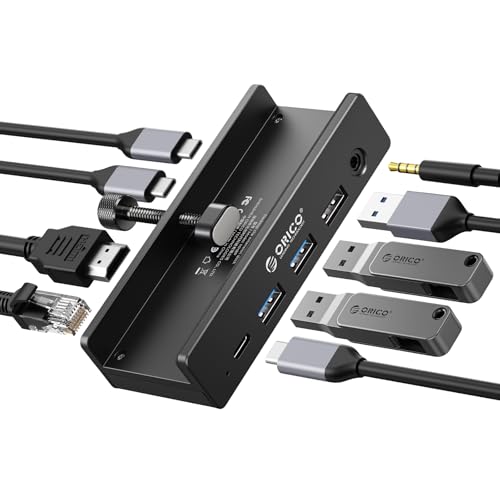
ORICO Clip Docking Station, 8-in-1 Clamp USB C Hub with 4K@60Hz HDMI, 100W PD, Gigabit Ethernet, 4xUSB Port, AUX, 10Gbps Clamp Docking Station for Laptop, MacBook, PC (Adapter Not Included)
$43
upfront
7.8mo
payoff
$66
/ year
The ORICO 8-in-1 Clip Docking Station is for desk-heavy users who want a cleaner setup. The clamp design attaches directly to your laptop or monitor, and you get extras like Gigabit Ethernet, a 3.5mm audio jack, and 10Gbps data speeds. At $42 it takes longer to break even (about 7 months in the base scenario), but if you're docking daily, the added ports and build quality justify the premium.
Check current price →Price shown is approximate. Click for current price. Affiliate link.
What we didn't account for
- → Adapter spending varies wildly Our $65/year estimate assumes regular adapter purchases and occasional losses. If you're careful with your gear and rarely need new adapters, your actual savings will be lower — possibly much lower.
- → Hub lifespan isn't guaranteed The math assumes your USB-C hub lasts at least a couple of years. Budget hubs with poor thermal design or flimsy connectors may fail sooner, resetting your payoff clock.
- → Not all ports are equal A hub's HDMI output, data transfer speeds, and power delivery vary by model and price. If you need high-performance specs (4K@60Hz, 10Gbps data), you may need to spend more than the $20 baseline.
- → Doesn't account for convenience value We only measured dollar savings. Having one device instead of four loose dongles also saves time and sanity — but we didn't try to put a price on not tearing apart your bag at the airport.
See how USB-C Hub compares to other tech products.
Tech Rankings →